
Bus Tracker
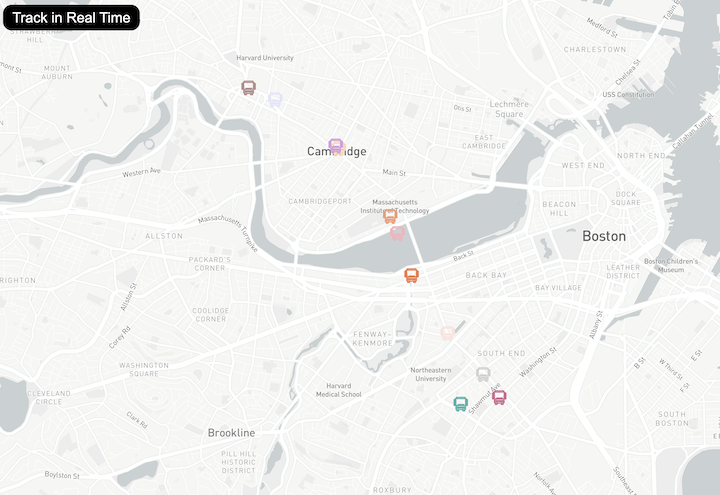
The application uses publicly available data from Massachusetts Bay Transportation Authority; the largest transit system in Massachusetts. The bus icons on the map represent the real time locations and occupancies of the buses the authority runs in Boston, and the Icons and occupancy update every three seconds, the fastest possible update time to conform with the 20 requests per minute on a free plan. There is a map key in the bottom right corner that shows what the color of the icons represent, and if there are no bus icons on the map, a message will pop up saying that currently there are no busses running. This project is mobile responsive and looks great on screens of all sizes.
Technology Utilized
This real-time bus tracker application is built using a modern web technology stack featuring Mapbox GL JS v1.11.0 as the core mapping library for rendering interactive maps and managing custom SVG bus markers. The frontend is developed with vanilla JavaScript (ES6+) utilizing modern features like async/await for asynchronous API calls, arrow functions, and template literals. The application consumes real-time transit data from the MBTA (Massachusetts Bay Transportation Authority) V3 REST API, which provides live vehicle locations, occupancy status, and trip information for Boston's Route 1 buses. The user interface is styled with custom CSS3, implementing Flexbox layouts, CSS transforms, and box shadows to create a clean, responsive design with an occupancy legend overlay and a dynamic disclaimer system. The map visualization uses SVG (Scalable Vector Graphics) for the bus icons, with dynamically colored markers based on real-time crowding levels. The application follows a client-side architecture with HTML5 as the markup foundation, and employs DOM manipulation for dynamic content updates without requiring any frameworks or build tools, making it a lightweight, dependency-free solution that runs entirely in the browser.
Build Context
This app was one of the first projects I made to learn how to integrate third party APIs into a web apps. At the time of building this, I was new to reading API documentation, and I had to learn what constraints and limitations I was confined by, as well as what different methods I could use to fetch information. I was really interested in utilizing mapping technology at the time, as I believed as I do now years later, that it is an underutilized resource that helps connect end users with points of interest, or information that they can relate to themselves.